YouTube Official Blog
Homepage Hero Slider

-
1 / 5
-

2 / 5
-
3 / 5
-

4 / 5
-
5 / 5
-
1 / 5
-
2 / 5
-
3 / 5
-
4 / 5
-
5 / 5
-
1 / 5
-
2 / 5
-
3 / 5
-
4 / 5
-
5 / 5
-
1 / 5
-
2 / 5
-
3 / 5
-
4 / 5
-
5 / 5
-
1 / 5
-
2 / 5
-
3 / 5
-
4 / 5
-
5 / 5
-
1 / 5
-
2 / 5
-
3 / 5
-
4 / 5
-
5 / 5

-
Watch the LA Phil’s 'A Concert for Venezuela' live on YouTube
Aug 14, 2026
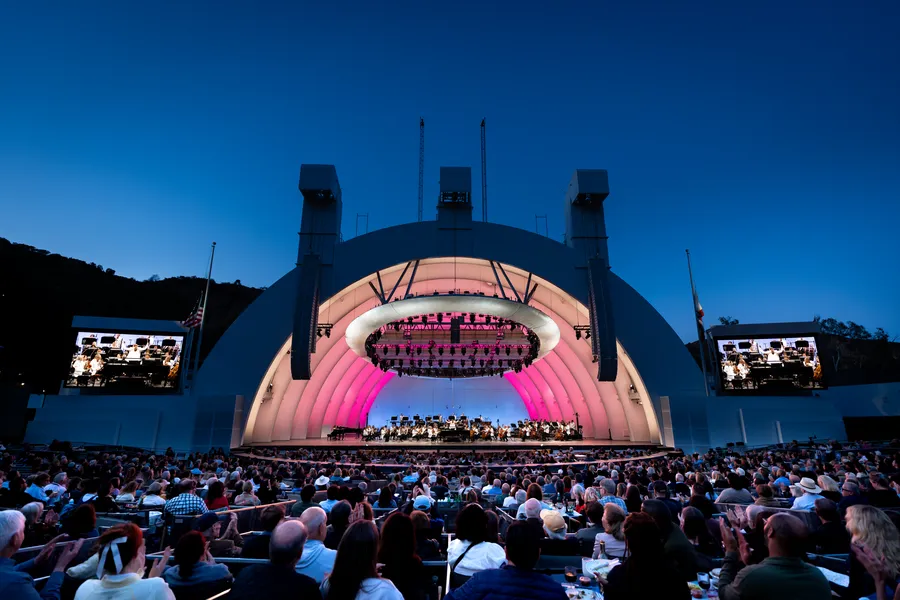
On August 23rd, Gustavo Dudamel’s highly anticipated finale concert with the Los Angeles Philharmonic will stream exclusively on YouTube, allowing fans around the globe to experience this special event and global fundraise for the earthquake victims in Venezuela.
Tune in to Gustavo Dudamel’s YouTube channel to see "A Concert for Venezuela" at the Hollywood Bowl celebrating the country's rich artistic heritage, highlighting pieces by Venezuelan composers alongside special guest performances by Beck, GIVĒON, Carlos Vives, and Natalia Lafourcade, and more.
How to watch and support
As you watch the performances, you'll be able to make a difference directly from your screen. A donate button will be available on the livestream, with proceeds going to the United Nations Development Program to aid in their earthquake relief efforts in Venezuela.
If you can’t make the live broadcast, check out the full concert on Gustavo Dudamel’s YouTube channel, giving you time to experience the performances and support the cause.
On August 23rd, Gustavo Dudamel’s highly anticipated finale concert with the Los Angeles Philharmonic will stream exclusively on YouTube, allowing fans around the globe to experience this special event and global fundraise for the earthquake victims in Venezuela.
Tune in to Gustavo Dudamel’s YouTube channel to see "A Concert for Venezuela" at the Hollywood Bowl celebrating the country's rich artistic heritage, highlighting pieces by Venezuelan composers alongside special guest performances by Beck, GIVĒON, Carlos Vives, and Natalia Lafourcade, and more.
How to watch and support
As you watch the performances, you'll be able to make a difference directly from your screen. A donate button will be available on the livestream, with proceeds going to the United Nations Development Program to aid in their earthquake relief efforts in Venezuela.
If you can’t make the live broadcast, check out the full concert on Gustavo Dudamel’s YouTube channel, giving you time to experience the performances and support the cause.
-
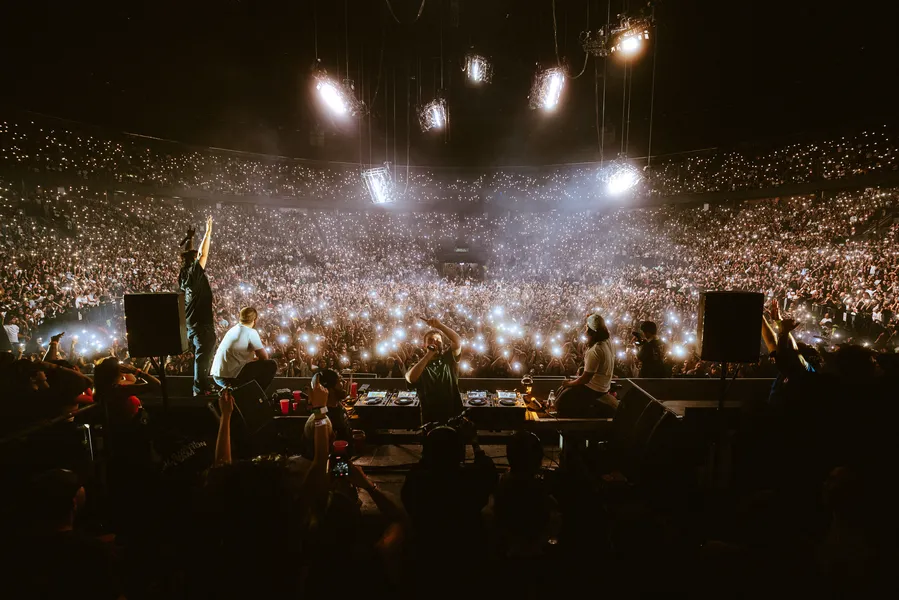
Listen to Fred again.. and LATIN MAFIA’S YouTube Music exclusive
Aug 12, 2026
Fred again.. and LATIN MAFIA wrapped an epic three-day livestream – that had over 7.5 million livestream views1 – in Mexico City, creating a won’t-stop-until-we-finish new mixtape that provided fans all over the world a rarely seen behind-the-scenes look into the process of making music. To celebrate 9 months and 50 hours, they then took over the Palacio de los Deportes for an arena show with over 20,000 fans.
Stream the exclusive live set
Because this entire project is about giving fans more access to the music they love, Fred again.. and LATIN MAFIA are dropping another surprise. Today, you can stream the live recording of their Palacio de los Deportes set exclusively on YouTube Music.
You can also check out the entire mixtape with videos on Fred again..’s YouTube channel, which had over 300 million total channel views during the week of the livestream2.
Dive into the curated playlist
Fred again.. and LATIN MAFIA have also released a playlist on Fred again..’s YouTube channel, which includes music they listened to during the mixtape recording process, tracks that inspired the week, and also records from artists sampled across the mixtape.
Head to YouTube Music to relive the CDMX show and get a behind-the-scenes look into the Mixtape’s creation.
- July 28-30, 2026.
- Global, July 28 - August 3, 2026.
Fred again.. and LATIN MAFIA wrapped an epic three-day livestream – that had over 7.5 million livestream views1 – in Mexico City, creating a won’t-stop-until-we-finish new mixtape that provided fans all over the world a rarely seen behind-the-scenes look into the process of making music. To celebrate 9 months and 50 hours, they then took over the Palacio de los Deportes for an arena show with over 20,000 fans.
Stream the exclusive live set
Because this entire project is about giving fans more access to the music they love, Fred again.. and LATIN MAFIA are dropping another surprise. Today, you can stream the live recording of their Palacio de los Deportes set exclusively on YouTube Music.
You can also check out the entire mixtape with videos on Fred again..’s YouTube channel, which had over 300 million total channel views during the week of the livestream2.
Dive into the curated playlist
Fred again.. and LATIN MAFIA have also released a playlist on Fred again..’s YouTube channel, which includes music they listened to during the mixtape recording process, tracks that inspired the week, and also records from artists sampled across the mixtape.
Head to YouTube Music to relive the CDMX show and get a behind-the-scenes look into the Mixtape’s creation.
- July 28-30, 2026.
- Global, July 28 - August 3, 2026.
-

Get creative this back-to-school season
Aug 03, 2026
This August, YouTube Kids is uplifting high-quality arts and culture content with an exciting new Takeover experience designed to spark kids’ curiosity and creativity just in time for the Back to School season.
Running from August 3rd to September 7th, families can explore a dedicated section featuring high-quality content that brings the museum experience to life — from exploring space and dinosaurs to discovering history and creating art! To help fill a humanities content coverage gap for young learners, this special programming features exclusive videos from beloved creator Ms. Rachel and The Laurie Berkner Band as well as world-class institutions like The Met and MoMA.
Leaning into our "View and Do" concept, the Takeover encourages kids to take their learning beyond the screen.
This August, YouTube Kids is uplifting high-quality arts and culture content with an exciting new Takeover experience designed to spark kids’ curiosity and creativity just in time for the Back to School season.
Running from August 3rd to September 7th, families can explore a dedicated section featuring high-quality content that brings the museum experience to life — from exploring space and dinosaurs to discovering history and creating art! To help fill a humanities content coverage gap for young learners, this special programming features exclusive videos from beloved creator Ms. Rachel and The Laurie Berkner Band as well as world-class institutions like The Met and MoMA.
Leaning into our "View and Do" concept, the Takeover encourages kids to take their learning beyond the screen.
-

Join Fred again.. and LATIN MAFIA for a three-day livestream
Jul 28, 2026
Join Fred again.. and LATIN MAFIA streaming live from Mexico City. Starting now, the artists are hosting a three-day livestream on YouTube.
During the marathon session, fans can watch as they finish their collaborative Mixtape in real-time – offering a rare, unfiltered look into their creative process.
And it wouldn’t be a Fred again.. and LATIN MAFIA livestream without the fans. Your live comments help the artists to crowdsource ideas, test out new sounds, and connect with their global community in real-time.
Tune in to Fred again..'s YouTube channel starting today to catch the livestream and be part of the session.
Join Fred again.. and LATIN MAFIA streaming live from Mexico City. Starting now, the artists are hosting a three-day livestream on YouTube.
During the marathon session, fans can watch as they finish their collaborative Mixtape in real-time – offering a rare, unfiltered look into their creative process.
And it wouldn’t be a Fred again.. and LATIN MAFIA livestream without the fans. Your live comments help the artists to crowdsource ideas, test out new sounds, and connect with their global community in real-time.
Tune in to Fred again..'s YouTube channel starting today to catch the livestream and be part of the session.
-

Our expanded partnership with NBCUniversal: Redefining the modern entertainment subscription
Jul 27, 2026
We’re expanding our partnership with NBCUniversal across YouTube and YouTube TV to bring even more of the content you love into one place. Soon, eligible YouTube Premium subscribers in the U.S. will gain access to ad-supported Peacock Premium.
YouTube Premium has always been about bringing your favorite creators, artists, and cultural moments together uninterrupted. Now, we’re pairing that ultimate viewing experience with Peacock’s expansive lineup of live sports, blockbuster Universal movies, and hit original series.
For subscribers, this means:
- All-in-one entertainment: In addition to existing YouTube Premium features including ad-free viewing on YouTube, background play, downloads and YouTube Music, subscribers will gain access to ad-supported Peacock Premium.
- Stream the best of NBCUniversal: On Peacock, dive into marquee live sports, award-winning and blockbuster movies, and hit series – including the NFL, NBA, Saturday Night Live, Love Island USA, and Law & Order: SVU – right on YouTube.
- More flexibility: We’ll also be introducing international bundles and options to let subscribers upgrade their Peacock membership and choose the best plan for them.
As part of this agreement, a selection of live sporting events from NBCUniversal will stream on NBC Sports’ YouTube channel to millions of users.
Our goal is to provide subscribers with more choice and a variety of ways to enjoy and discover their favorite content through their membership, all in one place. We’ll share more details and official launch dates with YouTube Premium subscribers over the coming months. You can read more from NBCUniversal here.
We’re expanding our partnership with NBCUniversal across YouTube and YouTube TV to bring even more of the content you love into one place. Soon, eligible YouTube Premium subscribers in the U.S. will gain access to ad-supported Peacock Premium.
YouTube Premium has always been about bringing your favorite creators, artists, and cultural moments together uninterrupted. Now, we’re pairing that ultimate viewing experience with Peacock’s expansive lineup of live sports, blockbuster Universal movies, and hit original series.
For subscribers, this means:
- All-in-one entertainment: In addition to existing YouTube Premium features including ad-free viewing on YouTube, background play, downloads and YouTube Music, subscribers will gain access to ad-supported Peacock Premium.
- Stream the best of NBCUniversal: On Peacock, dive into marquee live sports, award-winning and blockbuster movies, and hit series – including the NFL, NBA, Saturday Night Live, Love Island USA, and Law & Order: SVU – right on YouTube.
- More flexibility: We’ll also be introducing international bundles and options to let subscribers upgrade their Peacock membership and choose the best plan for them.
As part of this agreement, a selection of live sporting events from NBCUniversal will stream on NBC Sports’ YouTube channel to millions of users.
Our goal is to provide subscribers with more choice and a variety of ways to enjoy and discover their favorite content through their membership, all in one place. We’ll share more details and official launch dates with YouTube Premium subscribers over the coming months. You can read more from NBCUniversal here.
1
5
YouTube Official Blog Card Grid
Kids & Teens Kids & Teens
YouTube shapes its youth ecosystem around five foundational principles designed to provide safer, developmentally appropriate experiences for kids and teens.